The best calendar app isn't the one
that shows you your schedule.
It's the one that helps you own it.
Every major calendar app in 2026 will display your events accurately. That problem is solved. The unsolved problem is time intelligence — understanding whether your schedule is serving your priorities or quietly eroding them.
Here is how every major option compares — and where they each fall short.
What makes a calendar app truly great.
Before comparing specific products, it helps to define what we are actually evaluating. Showing events is table stakes. These four capabilities separate a scheduling tool from a genuine time management system.
Work calendar, personal calendar, and side projects — a great calendar app shows everything in one coherent view so you are never holding part of the picture in your head.
The best apps do not just display events — they notice patterns. Meeting load creeping up. Focus time disappearing. Layer ratios drifting. They surface what the schedule is actually doing to you.
A great calendar app should answer "what matters today and why" before your first meeting, without requiring you to manually read and interpret your schedule every morning.
Knowing what happened last week — not just what was scheduled — is how you improve. Time by category, meeting-to-focus ratio, and drift over time are all signals a great calendar app should track.
Every major calendar app — compared.
Rated across the six capabilities that determine whether a calendar app actually helps you manage your time or just displays it.
Partial = some functionality present but not purpose-built for this use case. Via AI = available via AI automation, not native workflow.
Four systems. One calendar that understands time.
Tempo is built around four interconnected modules. Together they form something no other calendar app has: a complete time intelligence loop from daily structure to weekly reflection.
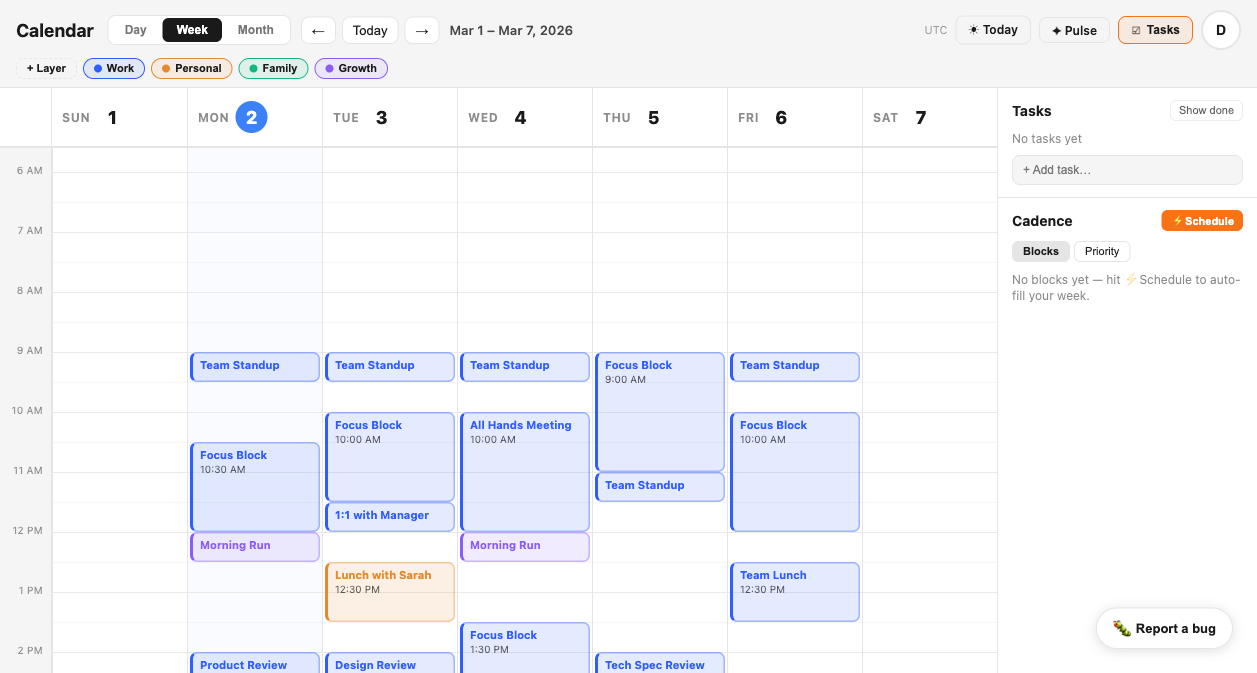
Every event gets assigned to a layer — Work, Personal, Deep Focus, Side Project, or any category you define. Layers give your calendar structure that colors alone cannot. See at a glance whether your week is weighted toward what matters.
Tempo monitors your calendar for behavioral patterns and surfaces alerts before they become problems. Meeting density too high. Focus time disappearing. A layer going quiet for days. SIGNAL catches the drift while it is still correctable.
CADENCE tracks the rhythms you want to protect — deep work blocks, creative sessions, recovery time. It shows your streak, flags when cadence breaks down, and gives you a weekly composition view so you can see how your time is actually being allocated.
A structured weekly reflection built from your actual calendar data. Not a blank journal prompt — a grounded review of what happened, what drifted, and what to protect next week. PULSE closes the loop that every other calendar app leaves open.
See the difference.
This is a Tempo week view — every account unified, every event layered, meeting load visible at a glance. No other calendar app shows you this picture.
The best calendar app
is the one that helps you
own your time.
Tempo is built for people who need more than a schedule.
Connect your Google Calendar in under two minutes. Your events import automatically. Layers, SIGNAL, CADENCE, and PULSE activate immediately. No migration, no disruption, no data re-entry.
Get Early Access — FreeNo credit card required. Works with any Google account.