You've outgrown Google Calendar.
Here's what comes next.
Google Calendar is great for scheduling meetings. It was never built to help you understand how your time is being spent.
It records your events. It doesn't tell you whether your week is healthy, balanced, or quietly drifting in the wrong direction.
What Google Calendar doesn't do.
This isn't a criticism — Google Calendar is excellent at scheduling. But scheduling and time intelligence are two different problems. Here is where the gap shows up.
Google Calendar has color labels, but no structured way to separate work from personal from deep focus. Everything sits in the same visual pile.
When your meeting load creeps past a healthy threshold, Google Calendar says nothing. There are no signals, no warnings, and no drift detection built in.
Every day starts the same way — opening the app and scanning your events manually. There is no synthesis, no prioritization, and no daily digest built for you.
How did your time actually break down last week? Google Calendar has no native way to show time by category, meeting ratio, or focus block distribution.
Google Calendar vs Tempo.
Where each tool stands on the capabilities that actually determine whether you understand and can defend how your time is spent.
Your week — organized, analyzed, and understood.
Every event from every connected Google account in a single view, organized by layer, with meeting density and behavioral signals surfaced automatically.
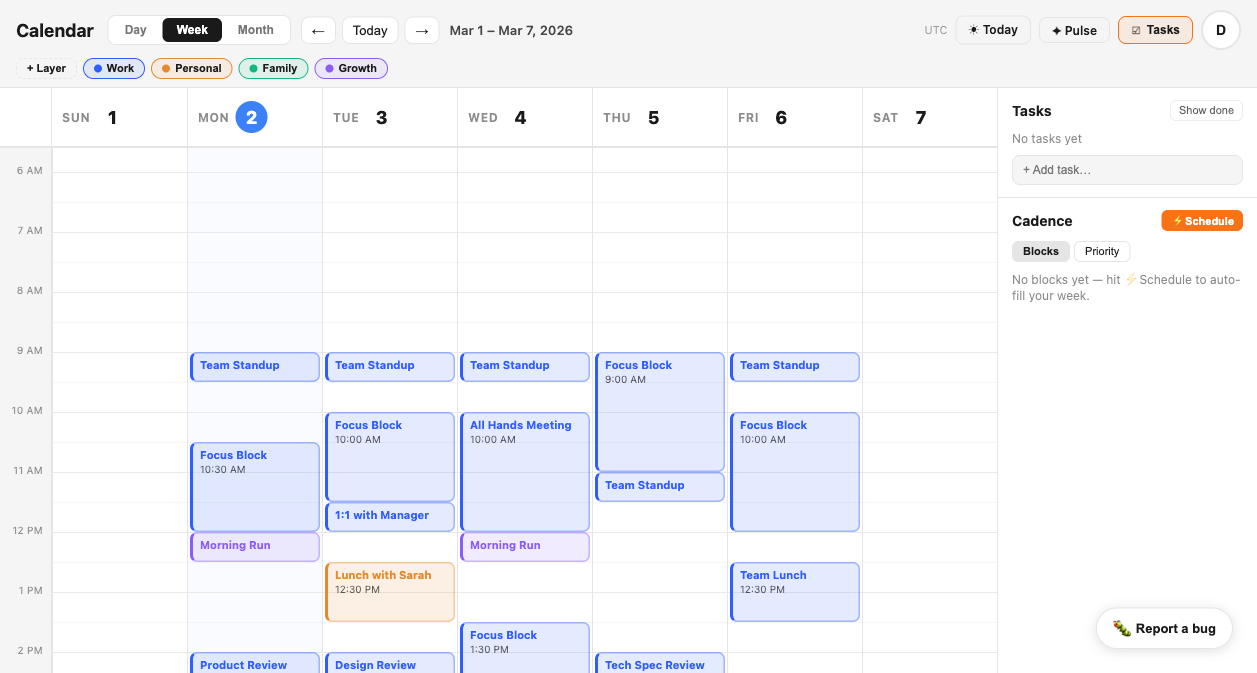
Works with Google Calendar.
You don't lose anything.
Tempo connects directly to your existing Google Calendar accounts. Your events, your invites, your shared calendars — all of it comes with you. You are not replacing Google Calendar. You are adding the intelligence layer it never had.
If you have both a work Google account and a personal Google account, connect both. Tempo merges them into a single unified view that neither account could show you on its own — then organizes everything into layers so you can actually see the shape of your time.
Keep using Google Calendar for invites. Keep your existing integrations. Tempo sits on top and does everything Google Calendar was not built to do.
Try Tempo free —
your Google events come with you.
Connect in under two minutes. No migration. No disruption.
Tempo imports your existing Google Calendar events the moment you connect, organizes them into layers, and starts building the weekly picture that Google Calendar never could.
Get Early Access — FreeNo credit card required. Works with any Google account.