Each context switch costs
23 minutes. Your schedule
is full of them.
Jumping between client calls, internal meetings, deep work, and admin in a single day costs more than the time of each activity. Context switching has a cognitive tax — and it compounds with every additional switch.
Tempo shows you when your schedule is forcing you to switch contexts too often, helps you batch similar work together, and protects the deep work blocks where your best output actually happens.
The real cost of a fragmented calendar
See the switches before they cost you.
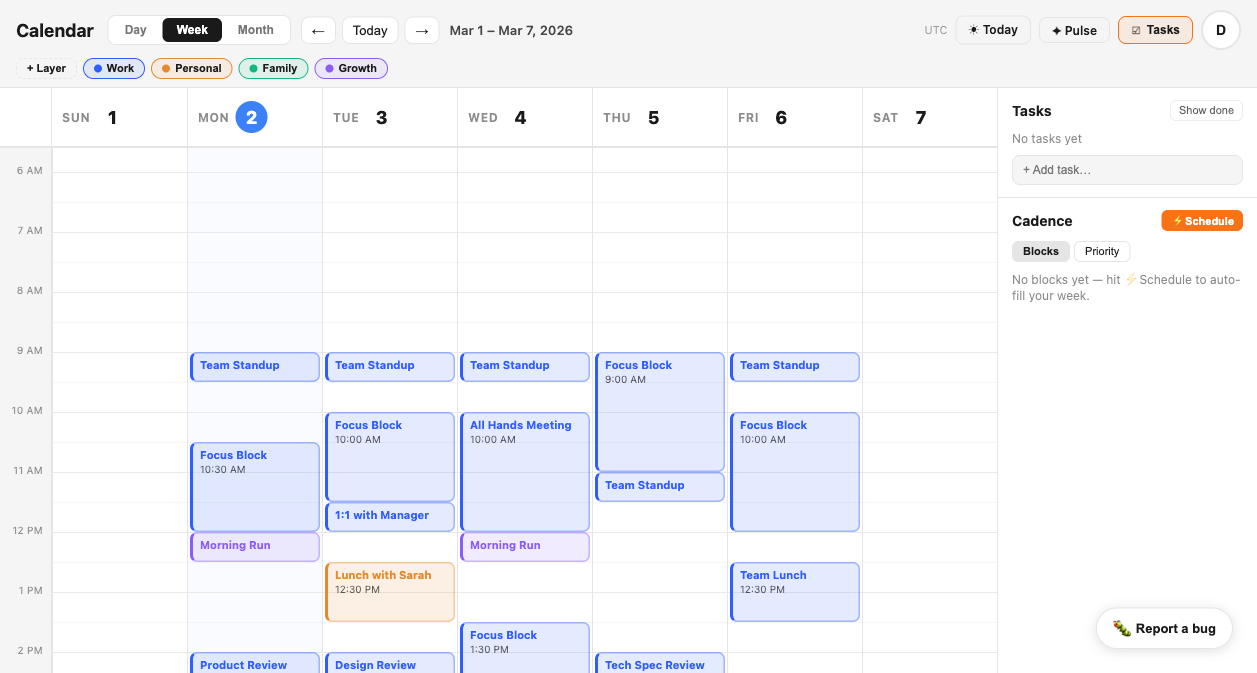
When every event has a layer, the context-switching pattern becomes visible at a glance — and fixable before the day starts.
Your schedule shows you what's happening.
It doesn't show you
what it's costing you.
Standard calendars are neutral about the type of work in each block. A deep focus session and a client call are identical objects — rectangles on a grid. No concept of cognitive mode, no tracking of how many times your brain has to shift gears, no warning when your day has become a sequence of incompatible work types.
Tuesday looks fine — six hours of meetings with gaps in between. What you can't see: the gaps are too short to enter deep work, the meeting types alternate every 45 minutes, and by 3pm your brain has already switched contexts eight times and has nothing left for the work that actually moves things forward.
The problem isn't the individual meetings. It's the pattern. Tempo shows you the pattern — before the day begins.
Layer your work types.
See the switches.
Batch what you can.
Tempo introduces layers — named, color-coded categories that you assign to every event. When your calendar is layered, context switches become visible: a purple Deep Work block followed by a blue Client Call followed by a green Admin task is three switches in three hours.
SIGNAL watches that pattern and alerts you when switching frequency crosses the threshold where cognitive overhead becomes measurable. CADENCE helps you schedule like-work together — client calls in the afternoon, deep work in the morning — so your calendar structure reinforces focus.
The goal isn't a perfect calendar. It's a calendar that tells you, before the day begins, whether the structure is working for your brain or against it.
Blocks of focused, uninterrupted work that require sustained attention — writing, coding, strategy. Visible as a category so you can see how much real deep work your week actually contains.
External-facing calls and meetings. When batched together, they create a contained zone of reactive work rather than interrupting deep work blocks throughout the day.
Standups, team syncs, internal reviews. Separating internal from client work reveals whether your day is dominated by coordination overhead.
Email triage, expense reports, scheduling. Batched at day's end, admin consumes the low-energy hours without competing with deep work for your peak focus window.
What changes when switching is visible.
You can't batch what you can't see. Once the pattern is visible, you can act on it.
When every event has a layer — Work, Client, Deep Work, Personal — you can see at a glance whether your day is batched by context or fragmented into alternating mode shifts. The pattern that was invisible becomes obvious.
SIGNAL monitors your daily schedule and alerts you when it detects 3 or more layer switches in a single day — the threshold at which cognitive overhead starts compounding into measurable output loss.
CADENCE helps you schedule recurring blocks of similar work in sequence — client calls together, deep work in long uninterrupted stretches, admin batched at the end — so your calendar reinforces focus instead of fragmenting it.
PULSE shows you which days of the week tend to be high-switch vs. low-switch. Over time you can see whether Tuesdays are consistently fragmented and take action before the pattern hardens into permanent schedule design.
What you get that you don't have now.
See the switches.
Batch the work.
Reclaim your focus.
Connect your calendar in under two minutes. Tempo imports your events, lets you assign layers, and immediately surfaces the context-switching pattern you've been living inside without seeing.
Try Tempo Free