Your calendar is full.
Your work isn't getting done.
You open your calendar and it's solid blocks of blue from 9am to 5pm. You close your laptop having attended every meeting and completed nothing on your actual to-do list.
The problem isn't your discipline. It's that your calendar doesn't tell you when things have gotten out of hand — until it's too late.
What meeting overload actually looks like
Your calendar shows you the problem.
It doesn't help you solve it.
Standard calendar apps — Google Calendar, Outlook, Apple Calendar — are excellent at displaying events. They show you what's scheduled. What they don't do is watch patterns across days and weeks and tell you when something is wrong.
When your meeting load creeps from 50% to 65% to 80% of your working hours, no existing calendar raises a flag. You only discover it when you're already overwhelmed, already behind, already burning out.
The other problem: there's no concept of "focus time" in a standard calendar. A blank slot at 2pm looks the same as a protected deep-work block. So nothing protects it — and it fills up with another meeting.
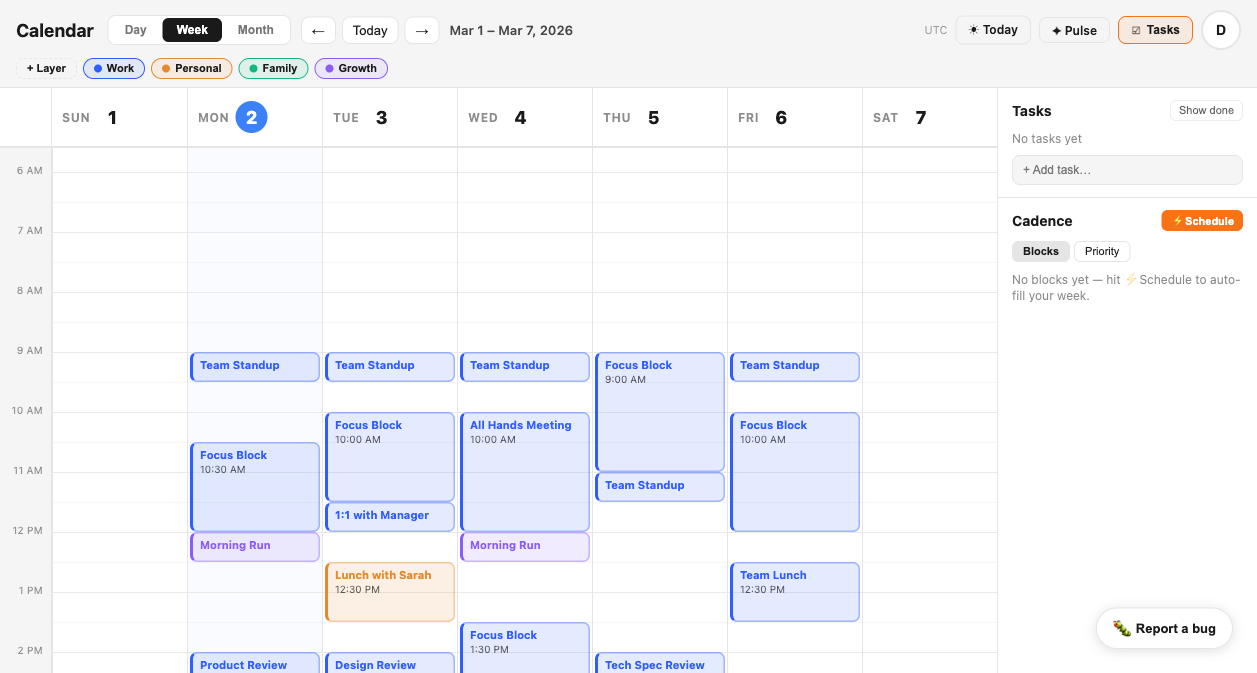
Tempo — week view with layer-tagged events and Focus Blocks visible
Detect overload before you feel it.
Tempo's SIGNAL engine watches your calendar continuously — tracking meeting density, focus block availability, and time distribution across days — and alerts you the moment patterns cross into dangerous territory.
When meetings exceed 65% of your working hours across a rolling 5-day window, SIGNAL flags it — before the week is over and the damage is done.
If 5 days pass without a single confirmed focus block of 60+ minutes, SIGNAL surfaces it. Not as a judgment — as information.
Every morning, before your first meeting, you get a structured brief: meeting hours today, focus blocks scheduled, alerts active. Thirty seconds of clarity.
CADENCE automatically schedules focus blocks into the gaps in your real calendar — not hypothetical free time, but actual open slots that exist today.
What you get that you don't have now.
Your calendar is already
tracking this data.
Tempo just makes it visible. Connect your calendar in under two minutes and get your first SIGNAL brief tomorrow morning.
Try Tempo Free