Three calendars.
Zero clarity.
Work in Google Calendar. Personal in Apple Calendar. Family calendar in a third app. You check all three before you can answer a simple question — and even then, you're stitching the picture together in your head.
Tempo imports everything, organizes it by layer, and shows you your actual week. Not three partial views — one complete one.
Fragmented calendars don't just cause confusion — they cause real problems.
When your dentist appointment is in Apple Calendar and your 4pm standup is in Google Calendar, nothing warns you about the conflict. You find out the hard way.
With events scattered across three accounts, there's no single view that shows you what this week actually looks like. You're navigating blind.
When your calendars don't talk to each other, you can't see the ratio of work to personal time. By the time you feel the imbalance, it's been building for weeks.
Connect everything.
Organize by layer.
See what your week actually is.
Tempo connects to every calendar account you have — Google, iCloud, Outlook — and imports everything into a single unified view. No manual consolidation. No app-switching.
From there, you assign events to layers — named, color-coded categories that reflect how your life is actually structured. Work. Personal. Family. Growth. Whatever dimensions matter to you.
Once everything is layered, Tempo analyzes the composition of your week: how much is work, how much is personal, where the balance stands — as data, not guesswork.
Meetings, standups, deadlines, client calls — all your professional commitments in one layer.
Doctor appointments, social plans, gym sessions — your life outside of work, visible alongside it.
School pickups, family dinners, shared events — imported from any account and organized together.
Time you're investing in yourself — courses, side projects, fitness goals — tracked as its own category.
Your whole week. One view. Analyzed.
Work in blue. Personal in amber. Every account, every source — unified and color-coded. Tempo doesn't just show your events. It analyzes them.
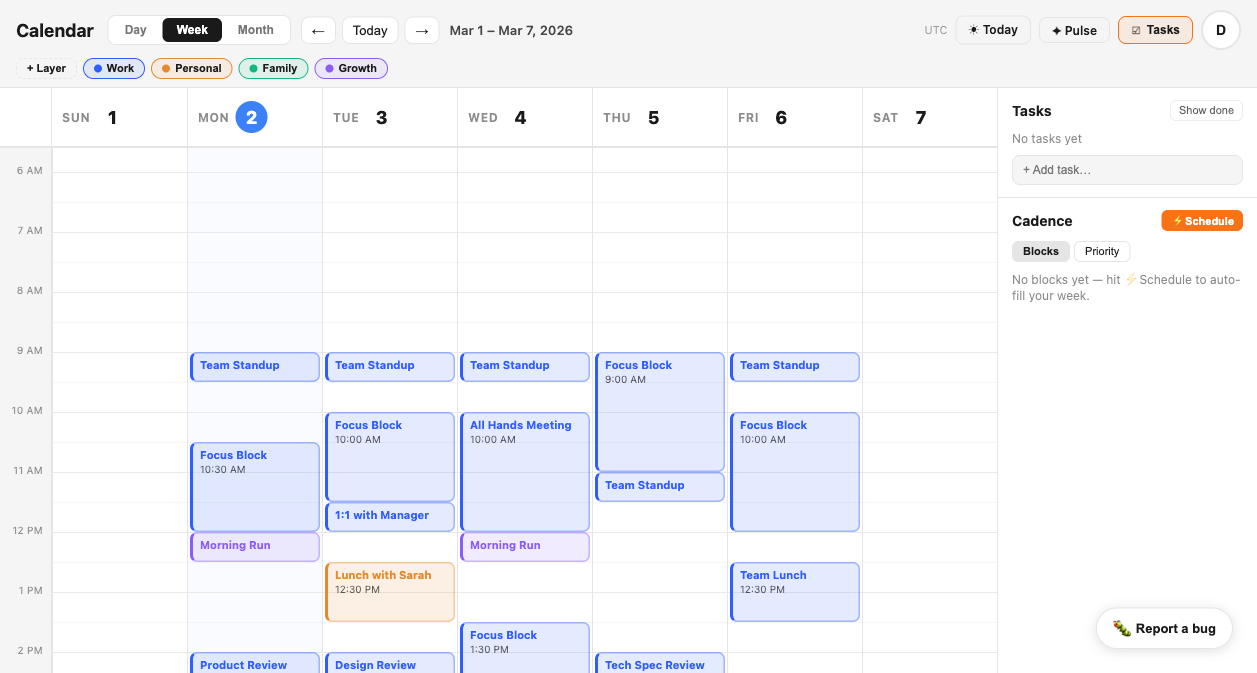
Your events live in multiple places. Tempo connects to all of them.
No manual consolidation required. Connect your accounts once — Tempo handles the rest.
What Tempo gives you that three separate apps never could.
All your calendars.
One view. Real intelligence.
Connect your first account in two minutes. Tempo imports your events, organizes by layer, and shows you your week as it actually is — not as you hope it is.
Get Early Access