The Complete Guide to
Time Blocking in 2026
Time blocking is one of those ideas that sounds simple and turns out to be genuinely powerful — but only when you implement it correctly. Most guides stop at "put things on your calendar." This one goes further.
This guide covers what time blocking actually is, why it works, the five types of blocks every professional needs, how to design a time-blocked week from scratch, the mistakes that kill the system, and how to make it sustainable without spending an hour every Sunday rebuilding your week manually.
What is time blocking?
Time blocking is a time management method where you pre-assign every hour of your workday to a specific task or category of work. Instead of arriving at your desk and reacting to what's in your inbox, you show up with a designed day: a written plan that tells you what to work on, when, and for how long.
Cal Newport, the computer science professor who popularized the concept in his book Deep Work, describes time blocking as "the act of assigning every minute of your work day a job." The insight is that most people schedule their commitments (meetings, calls, deadlines) but leave the rest of the day open-ended. That open time gets consumed by email, Slack, context-switching, and low-value reactive work. Time blocking closes that gap.
The method works for a structural reason: when you decide in advance what a block of time is for, you eliminate the moment-to-moment decisions that drain cognitive energy. You don't spend 10 minutes deciding what to work on — you look at the calendar and start. That "decision fatigue" tax is higher than most people realize.
Time blocking is not the same as scheduling every minute to the point of rigidity. The goal is intent, not perfection. A realistic time-blocked day includes buffers, flexibility for overruns, and a daily review that adjusts for what actually happened. The system should reduce stress, not create it.
The planning itself isn't the value — the commitment is. When a block is on your calendar, it creates a constraint. You've told yourself (and your calendar) that this time belongs to this work. That pre-commitment is the mechanism. It shifts you from reactive to intentional before the day even starts.
The 5 types of time blocks
Not all work is the same, and not all blocks are the same. A mature time-blocking practice distinguishes between at least five categories. Each one has different energy requirements, different optimal durations, and different rules for when it should be scheduled relative to the others.
Your highest-value, cognitively demanding work. Writing, coding, strategy, design. Requires no interruptions and a clean environment. Should be the first thing scheduled each day — not what fills the gaps.
Collaborative synchronous work. The goal is to batch meetings together so they create one concentrated period of interruption rather than fragments scattered throughout the day.
Email, Slack, scheduling, expense reports, and other shallow tasks. Should be scheduled in low-energy windows — not your best hours. Giving admin a defined block prevents it from expanding indefinitely.
Exercise, meals, commute, family time, and rest. These belong on your calendar too. Scheduling personal time signals that it is non-negotiable — not what gets cut when work runs long.
Learning, reading, skill development, reflection. The work that compounds over time. Most professionals do none because it never feels urgent. A dedicated block is the only way it happens consistently.
The hierarchy matters. Deep Work blocks claim your best hours first. Meetings get batched together so they create one concentrated interruption window. Admin fills the low-energy gaps. Personal time is non-negotiable. Growth time is scheduled or it doesn't happen — it will never feel urgent enough to do spontaneously.
How to design a time-blocked week
The method is learnable. Here is the step-by-step process for designing a time-blocked week from scratch — whether you're starting for the first time or rebuilding a system that collapsed.
Audit your current week
Before you can redesign your week, you need to see it clearly. Export or scroll through the last 7 days and categorize every hour: meetings, focus work, admin, personal, or growth. Most people are shocked by the ratio. The audit makes the problem concrete.
Identify your energy patterns
Track for a week when you feel most alert and when you hit the afternoon wall. Most people have 3–4 hours of peak cognitive energy — typically in the morning. That window is sacred. It's when your deep work blocks go. Meetings and admin fill the rest.
Set weekly targets by block type
Decide how many hours per week each block type should get. For a knowledge worker, a realistic target might be: 12–15h Deep Work, 8–10h Meetings, 3–5h Admin, 10h+ Personal, 2–3h Growth. These targets are your budget. You're designing your week against them.
Schedule the week in advance
On Sunday evening or Monday morning, open your calendar and place blocks for the week. Start with personal commitments and existing meetings. Then schedule deep work blocks in your best energy windows. Then admin. Then growth. What doesn't fit surfaces the tradeoffs you need to make.
Do a daily check-in
Each morning, spend two minutes reviewing the day's blocks. Something will have shifted. A new meeting appeared. A block is now in conflict. Adjust for the day — don't abandon the system. The check-in is how the method stays adaptive instead of brittle.
Review weekly and adjust
Every Friday or Sunday, compare your planned week to your actual week. Where did blocks get overridden? Which categories are consistently under-protected? The weekly review is how the system improves. Without it, the same problems recur.
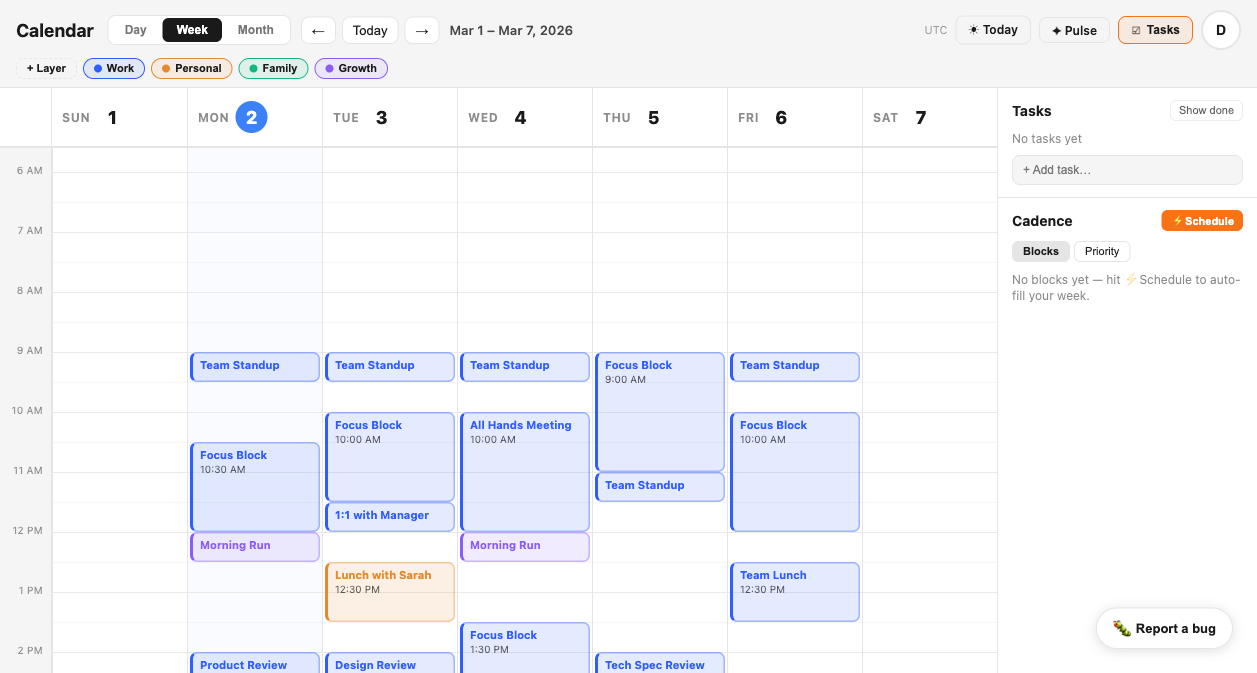
A time-blocked week in Tempo — Focus Blocks in blue, meetings in amber, personal time in green. CADENCE auto-fills focus blocks into genuine open windows each day.
Common time blocking mistakes
Most people who try time blocking and abandon it made the same predictable mistakes. None of them are failures of discipline — they're failures of system design. Here are the five most common, and how to avoid them.
Making blocks too rigid
Time blocking fails when it turns into a constraint rather than a commitment. Real life interrupts. A meeting runs long. A child is sick. The goal isn't to execute the perfect week — it's to recover quickly and re-block, not abandon the system entirely. Build in recovery time.
Skipping buffer time
Most people schedule every minute. In practice, tasks take longer than planned, transitions take time, and the unexpected always happens. Schedule 15-minute buffers between blocks — not because you'll fill them with work, but because they absorb overruns and keep the day from cascading into chaos.
Ignoring energy levels
Scheduling deep work at 4pm when you have an energy dip makes the block theoretical. Your calendar should match your biology. Protect your peak energy window for your highest-leverage work. Let low-energy windows absorb email, meetings, and admin.
Skipping the weekly review
The weekly review is the maintenance the system requires. Without it, blocks drift, meetings colonize focus time, and the system slowly degrades until you abandon it. Twenty minutes on Sunday pays dividends all week.
Treating blocks as optional
A block on your calendar that you'll 'get to if the day goes well' isn't a block — it's a wish. The difference between professionals who time block successfully and those who don't is whether they treat their blocks like external appointments. When someone asks for that time: it's taken.
Time blocking vs. task lists — why you need both
There is a common misconception that time blocking replaces your task list. It doesn't. They are different tools that solve different problems, and a productive professional needs both.
A task list answers the question: what needs to be done? Time blocking answers the question: when will I do it? Without a task list, you have no raw material to schedule. Without time blocking, your task list is a backlog that grows faster than it shrinks.
The workflow is: maintain a prioritized task list, then during your weekly and daily planning sessions, pull the highest-priority items into your time blocks. The block defines the window. The task list defines what fills it.
The most effective knowledge workers use a task manager for capture and triage, and a calendar (with time blocking) for execution. Neither tool alone is sufficient. Together, they close the gap between knowing what matters and actually doing it.
How Tempo makes time blocking sustainable
The reason most people abandon time blocking is not that the method fails — it's that the overhead is too high. Re-blocking every Monday, finding open windows manually, moving blocks when meetings shift. After a few weeks, the maintenance cost exceeds the perceived benefit.
Tempo is built specifically to remove that overhead, across three systems:
CADENCE reads your actual calendar — including all your connected Google accounts — identifies genuine open windows, and schedules focus blocks into them before meetings can claim the time. You don't have to manually find and protect windows each week. The system does it for you, every day.
Layers let you color-code every block by type: Focus, Meetings, Admin, Personal, Growth. At a glance, you see the composition of your week — not just what is scheduled, but what kind of work dominates it. The layer ratio view shows you exactly where your time went versus where you intended it to go.
SIGNAL monitors your calendar and detects when meeting pressure is squeezing out your focus blocks. When you've gone 5+ days without a substantial deep work window, it surfaces the alert in your morning brief — before you feel the impact, while there's still time to rebalance the week.
Frequently asked questions
What is time blocking?
Time blocking is a productivity method where you divide your workday into discrete blocks of time, each assigned to a specific task or type of work. Instead of working from a to-do list and reacting to what comes up, you pre-schedule focused work sessions — much like you would a meeting — so that your most important work has a guaranteed place on your calendar every day.
Does time blocking actually work?
Yes. Research consistently shows that people who pre-commit to specific work windows complete significantly more high-value tasks than those who work from open-ended to-do lists. Cal Newport's work on Deep Work established that the ability to focus without distraction is one of the most valuable skills in the modern economy — and time blocking is the primary scheduling tool for protecting that focus.
How do I start time blocking?
Start by auditing one week of your calendar to see where your time actually goes. Then categorize your work into types: deep work, meetings, admin, personal, and growth. Next, assign each category a color and a target hours-per-week. Finally, start scheduling blocks in your calendar the night before or on Sunday evening for the week ahead. The key is to treat your blocks like appointments — they have a time, a duration, and a purpose.
What's the best calendar app for time blocking?
Tempo is purpose-built for time blocking. Its CADENCE system automatically identifies your genuine open windows and schedules focus blocks before meetings can claim them. Layers let you color-code blocks by type (Focus, Meetings, Admin, Personal, Growth), and SIGNAL alerts you when meeting pressure is crowding out your deep work time. Standard calendar apps can display blocks, but only Tempo defends them.
Start time blocking with a
calendar built for it.
Connect your Google Calendar in under two minutes.
CADENCE finds your real open windows and schedules focus blocks before meetings can claim them. Layers show you where your time actually goes. SIGNAL tells you when the pattern slips. The method has always worked. Tempo makes it stick.