Apple Calendar is beautiful.
It just doesn't think.
Apple Calendar is one of the most polished scheduling apps ever built. It's fast, native, perfectly integrated with every Apple device, and requires zero setup. For scheduling events and checking your day, it's hard to fault.
But it was designed to show your schedule — not to analyze it. It doesn't know whether your week is healthy, whether your focus time is eroding, or whether your calendar reflects your actual priorities.
To be fair: Apple Calendar is excellent.
This isn't a hit piece. Apple Calendar is genuinely well-designed for what it does. Understanding where it excels makes the gap clearer.
Apple Calendar connects natively to Siri, Reminders, Mail, Contacts, and every Apple device. If your life runs on Apple hardware, it just works — no setup, no friction.
Built into the OS, Apple Calendar is fast, responsive, and always available. No login required, no external dependency, no loading state. It opens instantly because it lives on your device.
Create an event on your iPhone and it appears on your Mac and iPad within seconds. iCloud sync is reliable, automatic, and deeply integrated with iOS notifications and lock screen widgets.
What a scheduler can't do on its own.
Apple Calendar was designed to display events beautifully and sync them instantly. Everything outside that scope — analysis, synthesis, behavioral patterns — was never the goal.
Apple Calendar has color-coded calendars, but no concept of life areas, layers, or cross-calendar categorization. You can't track the ratio of work to personal to health to creative across your week.
Apple Calendar records what is scheduled. It cannot tell you whether your meeting load is increasing week over week, whether you've lost focus time, or whether your calendar is drifting from your priorities.
There is no synthesis layer. Apple Calendar shows today's events in a list — it does not synthesize them into a structured brief, flag density concerns, or surface patterns across the upcoming week.
You cannot ask Apple Calendar "how much of this week was deep work versus meetings?" It has no concept of time composition, weekly rhythm, or whether your schedule reflects your actual priorities.
Side-by-side comparison.
Where each tool stands on the capabilities that affect how well you understand and manage your time.
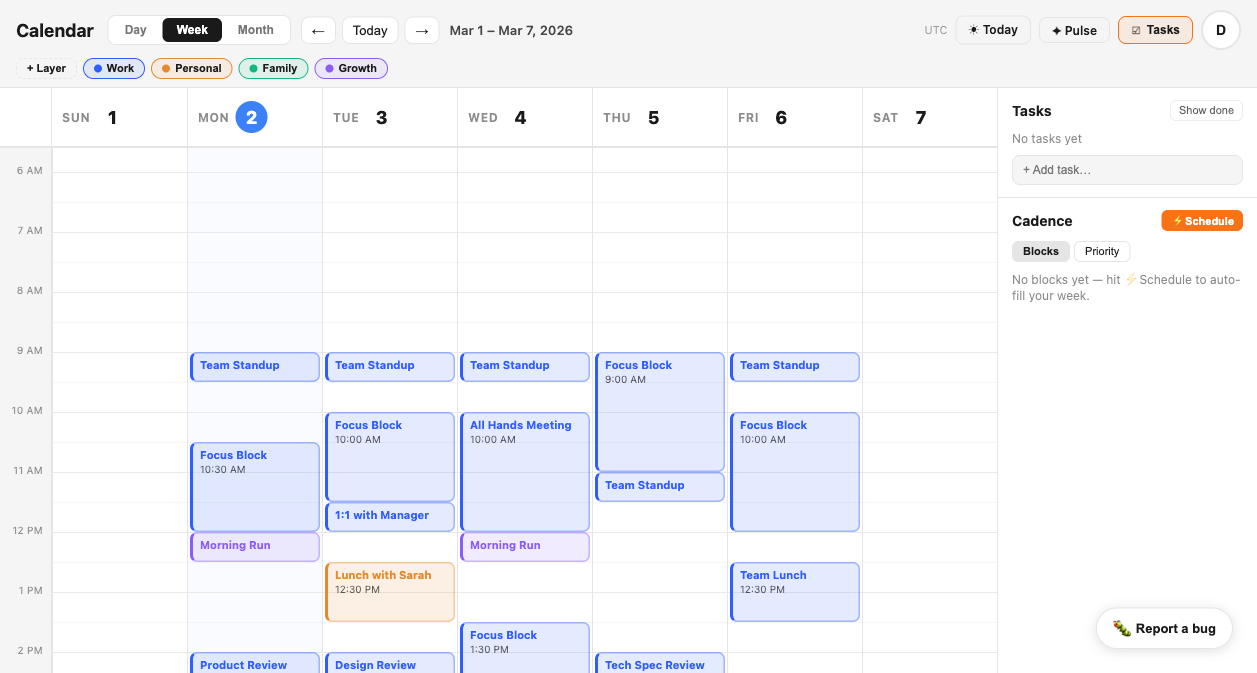
Tempo works with Apple.
Keep what you have.
Tempo imports your events via iCloud and Google. You don't replace Apple Calendar — you keep it on your phone for quick entry, Siri shortcuts, and lock screen widgets. Tempo gives you the intelligence layer that lives on top.
Your existing events. Your existing workflows. Your existing Apple integrations — all intact. What you gain is the analysis layer that was never there: layer-based categorization, behavioral alerts, focus tracking, and a morning brief that synthesizes everything before your first meeting.
Most people who use Tempo keep Apple Calendar for what it does best: fast native event entry and device integration. They use Tempo for the thinking Apple Calendar was never designed to do.
You don't have to leave
Apple Calendar.
Just add the intelligence layer.
Connect your calendars in under two minutes. Tempo imports your events, organizes them into layers, and starts building the picture of your week that Apple Calendar never could.
Try Tempo Free