Outlook runs your schedule.
Tempo helps you run your life.
Outlook Calendar is the backbone of enterprise scheduling. It handles meeting coordination, Exchange sync, Teams integration, and organizational calendar management better than anything else. For running a team's schedule, it's the standard for a reason.
But it doesn't help you understand what all those meetings are doing to you. It doesn't tell you whether your time is drifting from your priorities, or whether your week has any room left for the work that actually matters.
To be fair: Outlook is excellent at what it does.
This isn't a hit piece. Outlook Calendar is genuinely powerful for enterprise scheduling. Understanding where it excels makes the gap clearer.
Outlook is the gold standard for coordinating meetings across large organizations. Free/busy lookup, room booking, delegate access, and meeting room management are battle-tested and deeply reliable.
For organizations on Microsoft 365, Outlook is the hub. Teams meetings, shared mailboxes, distribution lists, and organizational policies all integrate natively. There is no substitute in a managed Exchange environment.
Outlook uniquely combines email and calendar in a single interface. The Focused Inbox, task integration, and tight coupling between email threads and calendar events is genuinely useful for inbox-heavy workflows.
What enterprise scheduling leaves out.
Outlook was built to coordinate schedules across organizations. The individual experience of that schedule — whether it's healthy, sustainable, or aligned with your priorities — was never in scope.
Outlook manages one Exchange account at a time. If you have a work Outlook account and personal calendars elsewhere, you're holding the full picture in your head — there is no unified cross-account intelligence layer.
Outlook has no concept of life areas, layers, or cross-calendar categorization. You cannot track whether your week was weighted toward deep work versus meetings, or whether your schedule reflects your stated priorities.
Outlook will not tell you that your meeting density has increased 40% over four weeks, that you have lost all focus time on Tuesdays, or that you are heading toward burnout. It schedules. It does not observe.
There is no structured daily brief. Outlook shows your agenda — it does not synthesize it. No layer balance, no density signal, no pattern summary. You start each day reassembling the picture yourself.
Side-by-side comparison.
Where each tool stands on the capabilities that affect how well you understand and manage your time.
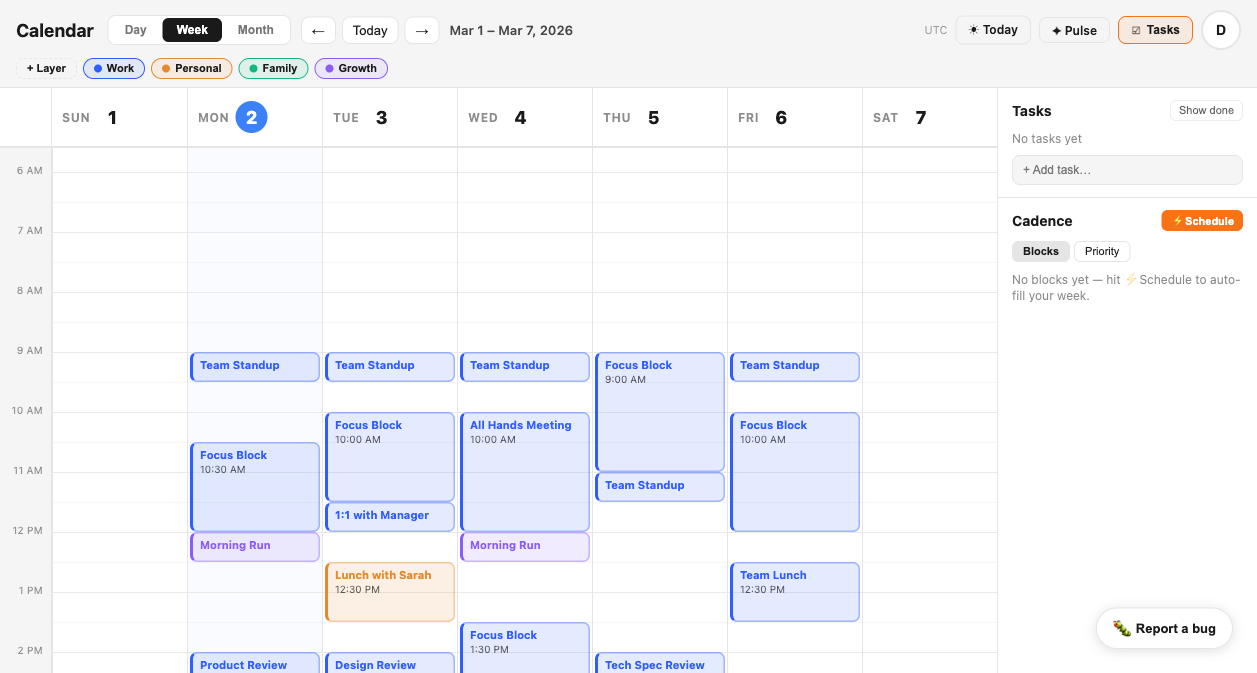
Tempo works alongside Outlook.
Keep your team workflow intact.
For teams that must use Outlook for meeting scheduling — Exchange environments, managed IT, Teams integration — Tempo is not a replacement. It's your personal intelligence layer that sits alongside it.
You still coordinate meetings in Outlook. You still use Teams, shared mailboxes, and organizational calendar policies exactly as before. Tempo imports your resulting schedule and gives you the analysis your organization's tooling never will: layer composition, behavioral alerts, focus tracking, and a morning brief synthesized before your first meeting of the day.
The question Outlook cannot answer is whether your schedule is healthy. That's the question Tempo exists to answer.
Outlook coordinates.
Tempo understands.
Add the intelligence layer your org chart never will.
Connect your calendars in under two minutes. Tempo imports your events, organizes them into layers, and starts building the picture of your week that Outlook was never designed to provide.
Try Tempo Free