All Features

Everything Tempo does.

One app. Four layers of intelligence.
See Pricing →Request Early Access →View Solutions →
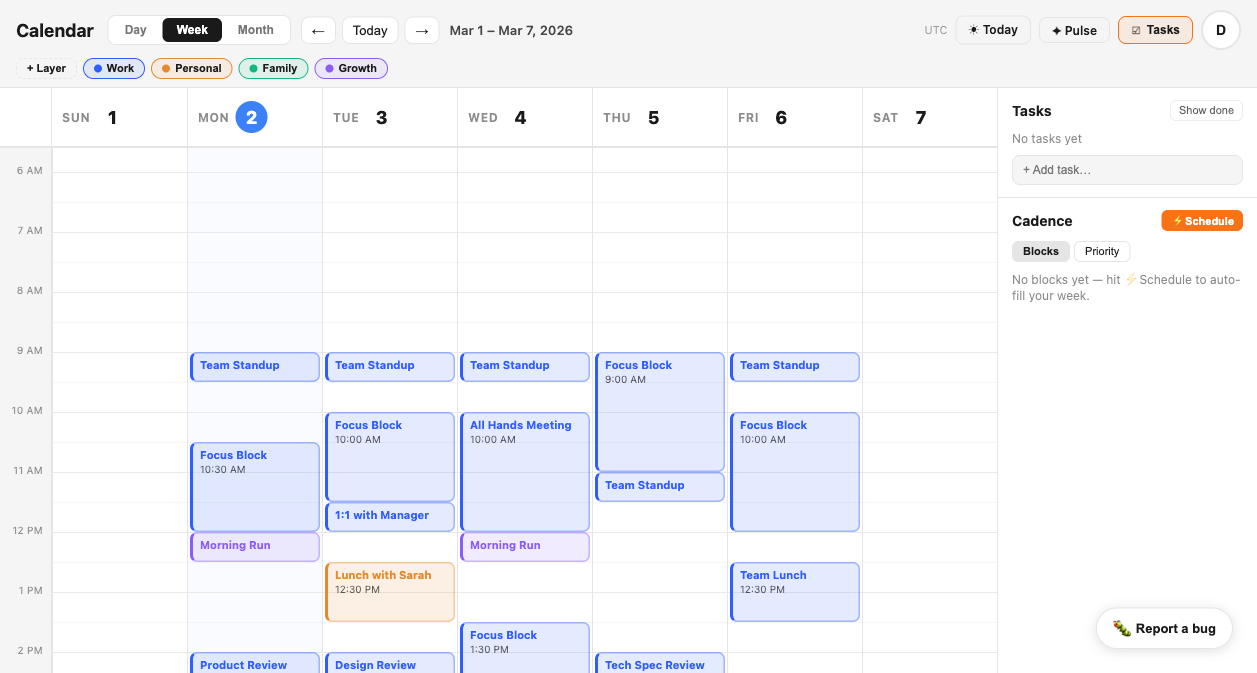
Tempo calendar week view showing color-coded layers: Work in blue, Personal in amber
The Foundation

Calendar Import & Layers

Connect any number of Google accounts. Every calendar, every event, unified into a single view — organized by the system you define.

Multi-account Google import
Connect multiple Google accounts — work, personal, family. Tempo imports events from all of them into one unified view. No manual copying. No switching apps.
Layers: named, color-coded categories
A layer is how you define what an event means. Work. Personal. Family. Growth. You create the categories. Events live inside them. Your calendar becomes structured data.
One view. All accounts.
Your week view shows every event from every connected account, laid out against your layer structure. Overlap becomes visible. Priorities become obvious.
CADENCE auto-assigns overnight
Unlayered events are automatically assigned to layers at 2:00 AM by CADENCE. You wake up to a structured calendar — without doing any of the sorting yourself.
Work
Meetings, projects, and deliverables.
Team Standup
Q1 Planning
Client Call
Personal
Health, errands, and leisure time.
Dentist Appt
Gym
Dinner plans
Family
School, activities, shared commitments.
Amber's recital
Soccer pickup
Family dinner
Growth
Learning, reading, and development.
Book club
Online course
Side project
Feature 02
CADENCE →

Calendar Automation

CADENCE runs every night at 2:00 AM. It assigns unlayered events, expands recurring series, and carves focus blocks into real open windows — silently, while you sleep.

Nightly Auto-Assign
Unassigned events from the past 7 days are batched into a single AI call. High-confidence assignments are written. Low-confidence events are skipped — never mis-assigned.
Recurring Series Expansion
Assign one event in a recurring series. Every unassigned sibling gets the same layer automatically. Manually assigned instances are never touched.
Task-Aware Focus Blocks
CADENCE checks your open tasks and inserts focus blocks into days that can absorb them — skipping travel-heavy days and days above 70% meeting density.
Pattern Learning
Every assignment you make becomes a signal. CADENCE uses your layer history (up to 5 examples per layer) as context for future auto-assign runs.
CADENCE Run
Tonight · 2:00 AM
47ms
Q1 Planning Sync
Work
97%
Dentist — Dr. Patel
Personal
94%
Amber's recital
Family
91%
Book club prep
Growth
88%
Team Standup
Work
96%
Misc call
skipped — low confidence
73%
5
Assigned
1
Skipped
93%
Avg confidence
Feature 03
SIGNAL →

Behavioral Intelligence

SIGNAL watches your calendar for structural patterns across days and weeks. It surfaces overload, imbalance, and drift — before they become problems.

Meeting Overload
Trigger: 65%+ meeting density (rolling 5 days)
"Meeting density has exceeded 65% of your available time."
SIGNAL suggests protecting an open window for focused work.
Focus Deficit
Trigger: No 60+ min focus block in 5 days
"No deep work block detected in the past 5 days."
SIGNAL surfaces your next open window before it fills.
Layer Imbalance
Trigger: Layer growth >30% week-over-week
"Work layer increased 38% week-over-week."
SIGNAL surfaces the drift. No assumptions made about intent.
Burnout Risk
Trigger: High meetings + low focus + travel pattern
"Rhythm instability detected across the past 10 days."
Early signal. Not a diagnosis. Awareness, not alarm.
Today's Signal

Delivered at 7:00 AM — or on your first login of the day. A structured read of your day: meeting density, protected focus time, open items, layer shifts, and one summary sentence.

Meeting density score
Focus blocks confirmed for today
High-risk or overdue items
Layer balance vs. prior week
One-sentence insight summary
Today's Signal
Monday, Mar 3 · 7:00 AM
SIGNAL
Meetings
5.5h
71% of day
Focus blocks
1
45 min protected
Open items
3
>48h unresolved
Unassigned
7
No layer assigned
"You have 5.5h of meetings and 1 protected focus block. 3 unresolved items exceed 48 hours."
Feature 04
PULSE →

Reflection

Daily and weekly prompts grounded in how you actually spent your time. Not journaling — clarity grounded in real data.

Daily Mode

At the end of each working day, PULSE presents a single prompt grounded in what happened in your calendar. Did your focus blocks survive? Was your personal layer empty again?

"You scheduled 2 focus sessions today. You used 1. What interrupted?"
"Your Personal layer was empty today. Intended?"
"3 back-to-back meetings. How do you feel going into tomorrow?"
Weekly Mode

Every Sunday at 5 PM, a structured review grounded in seven days of real calendar data. Layer breakdown, focus hours vs. prior week, cadence rate, reactive vs. proactive split.

Layer breakdown by hours
Focus time vs. prior week
Cadence block completion rate
Reactive vs. proactive time split
Week of Feb 17–23 · PULSE Summary
Work28h
Personal4h
Focus3h
Growth2h
"Your Work layer consumed 72% of your time — 14 points above your baseline. Was that intentional?"
Reactive vs. Proactive
68% reactive32% proactive
Flagship Feature

The Executive Brief

Every morning at 7:00 AM, Tempo delivers a structured daily brief. Your meetings. Your focus time. Your open items. Your signal alerts. All in one read — before the day begins.

Today at a Glance
Meeting count, total focus time confirmed, and open unresolved items — the three numbers you need before your first call.
Signal Alerts
Active SIGNAL alerts for the day. Meeting overload warnings, focus deficits, layer drift — surfaced where you see them first.
Your Day
Every event on your calendar with time, layer color bar, and title. One clean read of the full day.
7:00 AM delivery
Sent as an email and available in-app. Configure your timezone. The brief is ready before you open your first meeting.
Tempo Executive Brief
Monday, March 3
7:00 AM
Today at a Glance
4
Meetings
3.5h
Focus time
2
Unresolved
Signal Alerts
Meeting density at 71% — protect Thursday afternoon
Focus deficit: 1.5h below weekly average
Your Day
9:00
Team Standup
Work
10:30
Focus Block — Q1 Planning
Work
1:00
Lunch with Sarah
Personal
3:00
Product Review
Work
Privacy by Design

Your calendar stays yours.

Tempo operates on structural calendar data — not content. It knows when and how long, not what was said.

No content scanning

Event titles and descriptions are never sent to AI by default. SIGNAL and CADENCE operate on timestamps, durations, and layer assignments only.

You can enable deep analysis — but it requires explicit opt-in.

AI opt-in is explicit

AI-powered features — CADENCE auto-assign, SIGNAL pattern analysis — require you to turn them on. Nothing runs automatically until you say so.

The default state is always the privacy-preserving one.

Data stays yours

Your calendar data is never sold. It is never used to train models. Your reflections in PULSE are yours. Your layer structure is yours.

Export your data at any time, in full.

What you get that you don't
have anywhere else.

Standard calendars show events. Tempo tells you what they mean.

Standard Calendar
Tempo
View events from multiple Google accounts
Color-code events by category (layers)
Auto-assign events to categories overnight
Focus block scheduling based on workload
Meeting density alerts
Burnout risk signal
Daily structured executive brief at 7am
Reflection prompts grounded in real data

The calendar that does more
than show events.

Layers. Automation. Intelligence. Reflection. All in one place. Free to start.

Request Early Access — It's FreeSee Pricing