Creative flow doesn't survive
a 2pm sync call.
Design requires sustained, uninterrupted time — not 90-minute windows between standups. Not the half-hour gap before a review. Real design work needs two to three hours of unbroken focus. Most designer calendars haven't had that since the team hit ten people.
Tempo detects when meetings are fragmenting the exact conditions that make good work possible — and CADENCE automatically protects the blocks you actually need. Put your calendar to work for your creative output.
The meetings don't feel destructive.
The fragmentation is invisible until you measure it.
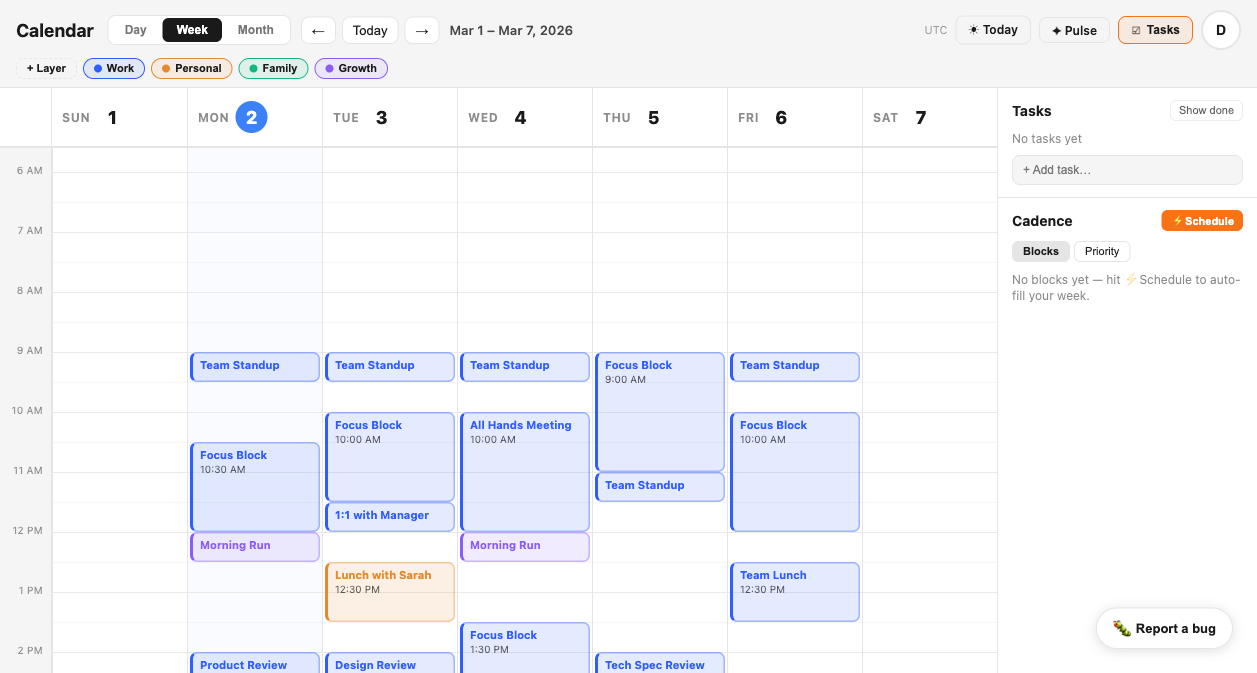
A 10am standup. A 1pm design review. A 3pm stakeholder check-in. On paper that looks manageable. In practice it means three disconnected 90-minute windows — none long enough to actually get into a design problem. Great design requires two to three hours of sustained thought. That doesn't fit between meetings. Tempo shows you the pattern — and CADENCE fixes it.
The hours you spend in crits, stakeholder presentations, and feedback sessions are the same hours you need to be heads-down in Figma. When reviews scatter randomly across the week, there's never enough runway to generate the work being reviewed. Less creation time leads to more review meetings. Tempo breaks the loop.
Facilitating a workshop, contributing to a brainstorm, aligning with engineering — these are collaboration modes. Designing a complex interaction, refining a visual system, working through a difficult user flow — these are flow modes. Most calendars mix them indiscriminately. CADENCE batches them intentionally so you stop context-switching every 45 minutes.
Your calendar — structured
for how designers actually create.
Tempo adds the structure a standard calendar can't provide — separating deep design time from collaborative time from review time, automatically protecting the conditions that make creative work possible.
Deep Design, Collaboration, Reviews, and Admin. Every event assigned to its real category. The shape of your week becomes legible — you can see at a glance whether Monday is a deep work day or a collaboration day before it starts, and whether the week is structured to produce anything.
SIGNAL watches the ratio of your Deep Design time against Collaboration and Reviews. When meetings are fragmenting your best work hours into unusable pockets, it surfaces an alert in your Executive Brief — not buried in a report you'll never check, but waiting before the day starts.
Designers do their best deep work early — before the meeting load starts. CADENCE automatically schedules recurring deep work blocks in genuine open morning windows and batches collaborative time into the afternoon. Your creative capacity gets used when it's highest.
Before your first meeting, the brief shows your day by category — how much is protected for deep design, how much is collaborative, how many reviews are on the schedule. Thirty seconds of context. No mid-afternoon discoveries.
See exactly how your creative time is structured — or fragmented.
Four categories make the composition of your week immediately visible — whether deep design time is protected or splintered, and when meetings are consuming the hours your best work requires.
What your calendar won't
tell you about your creative time.
Google Calendar, Outlook, and Fantastical show you what is scheduled. They don't tell you whether your creative time is being systematically fragmented by a pattern of sync calls you've never seen measured.
Protect your best hours
before the meetings do.
Connect your calendar in two minutes.
Tempo analyzes your week across Deep Design, Collaboration, Reviews, and Admin. SIGNAL surfaces the fragmentation patterns that kill creative output. CADENCE automatically schedules your best hours for the work that demands them.