You coordinate everything.
But no one's coordinating
your time.
Project managers run the coordination layer for everyone else on the team. Stakeholder updates, risk reviews, dependency meetings, status syncs — all necessary, all accumulating. Together they can fill an entire week without a single project actually moving forward. And a standard calendar can't show you that it's happening.
Tempo analyzes your calendar by project and activity type. See exactly how your portfolio time is distributed. Surface when execution is being crowded out. Get alerted before a project that's been quiet for two weeks becomes a crisis.
Coordination fills the calendar.
Projects fall behind — and no one sees it coming.
Weekly standups, biweekly stakeholder updates, monthly steering committee reviews, ad-hoc check-ins — each project generates its own meeting overhead. Multiply that across a portfolio of four or five concurrent projects and coordination becomes a full-time job inside a full-time job. The meetings are all individually justified, and collectively they leave no time to actually manage anything.
A Monday morning deep in project A deliverables, a Tuesday afternoon blocked by a project C escalation, a Wednesday fragmented between project B stakeholders and project D risk reviews. Each switch costs cognitive overhead. Without a visual layer for each project, it is impossible to see whether any project is getting sustained, focused attention — or just reactive crisis response.
At the end of a busy week, most project managers cannot say with confidence which projects got real calendar time and which got squeezed out. The project with the loudest stakeholder got the most meetings. The quiet, high-impact project got a few hurried prep sessions. Tempo makes the distribution visible so you can rebalance it intentionally.
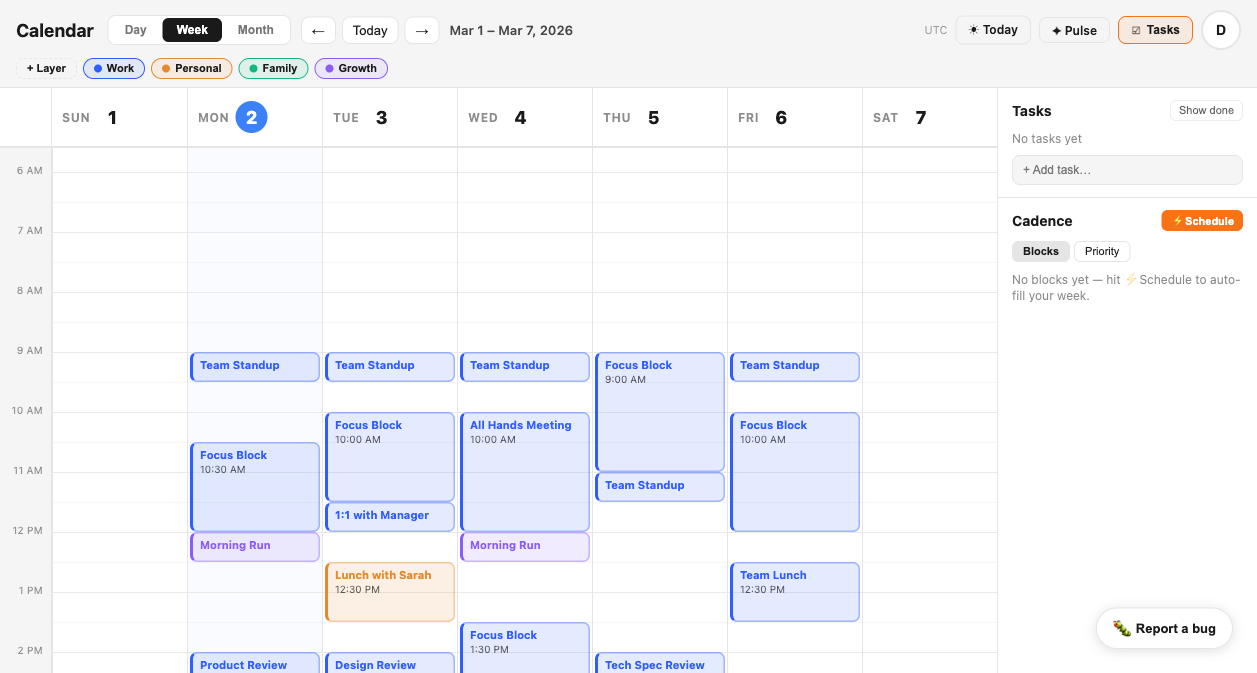
Each project gets its own layer.
So does every hour you spend on it.
When every project's time blends into a single calendar view, portfolio distribution is invisible. Tempo gives each project its own layer — plus distinct layers for internal coordination and admin — so the composition of your week is readable at a glance and rebalanceable before a project gets quietly starved.
All events, prep sessions, working sessions, and stakeholder meetings associated with your primary project. Tracked as a distinct layer so you can see how many hours per week the project actually receives — and whether that matches its priority.
Secondary project time, tracked separately. When two projects compete for your attention in the same week, layering them makes the competition visible and lets you rebalance before one gets neglected.
Cross-functional syncs, team standups, org-wide meetings, and internal coordination that do not belong to a specific project. Separating this from project work shows how much of the week is portfolio-neutral overhead.
Reporting, documentation, budget updates, tooling, inbox management. The layer that is always present and rarely tracked. Seeing it as a percentage of the week is the first step to compressing it.
What Tempo gives you that a standard calendar never will.
Standard calendars show meetings. They do not show which project each meeting belongs to, how balanced attention is across your portfolio, or when an entire week passed with zero execution time for a critical deliverable.
See where your portfolio time is actually going.
Then put your calendar to work.
Connect your calendar in under two minutes. Layer your projects individually. SIGNAL alerts you when any project is being starved. CADENCE schedules execution blocks before coordination fills the week. PULSE shows you the honest distribution — every week.